Chatbox

The Singing Box


Wednesday, July 7, 2010
:D
“As for God, his way is perfect; the word of the LORD is flawless. He is a shield for all who take refuge in him.” (Psalm 18:30)

Sunday, July 4, 2010
lov for you
Love you deserve no less,
Love I will give,
Not to your desires like a mess,
Nor the happiness that will not forever live.
Love I will give,
Not to your desires like a mess,
Nor the happiness that will not forever live.
Saturday, July 3, 2010
Problem -> Solution!
to solve
http://img32.imageshack.us/img32/8052/whatisthisa.png

it takes
http://answers.yahoo.com/question/index;_ylt=AhQh_knays2lNmukLaHSJlYjzKIX;_ylv=3?qid=20060925091609AAgRyMU
"Macro's can be a problem sometimes and can be used to unleash virus like behaviour on your system.
This can be fixed by going to the Tools menu and selection Options. Click on the Security tab, then click on the Macro Security button. You have a few choices of security levels but I recommend that you choose Medium.
OR
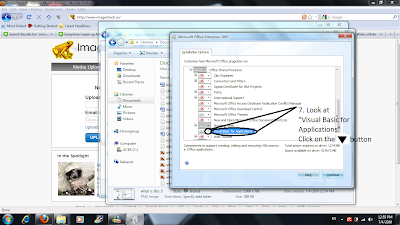
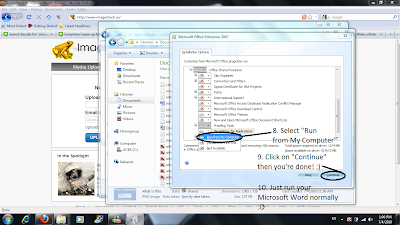
Sometimes you may not have VBA (Visual Basic for Applications) installed. So get your installation CD handy and follow these instructions (from Microsoft help):
- Run the Office Setup program again.
- On the Features to install screen in the Setup program, click the plus sign (+) next to Office Shared Features.
- Select Visual Basic for Applications, click the arrow next to your selection, and then click Run from My Computer."
An example visualized.
Step by step following each image.
http://img690.imageshack.us/img690/7223/whatisthis2.png
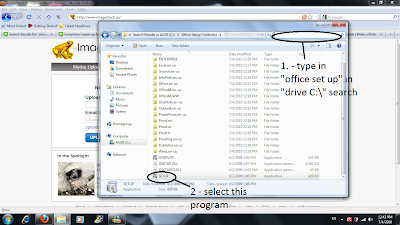
http://img227.imageshack.us/img227/2503/whatisthis3.png
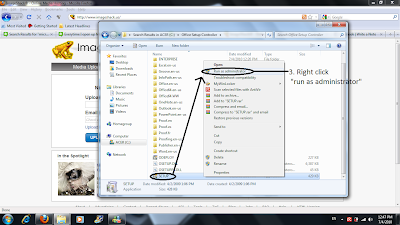
http://img693.imageshack.us/img693/6739/whatisthis4.png
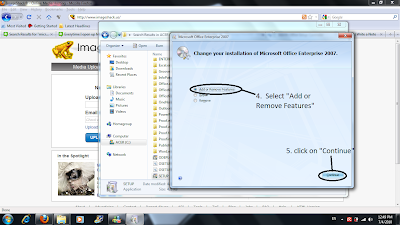
http://img337.imageshack.us/img337/3753/whatisthis5.png
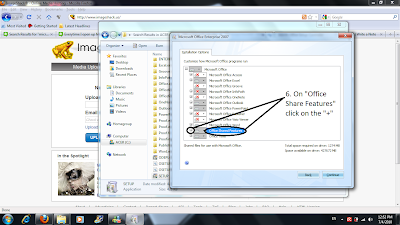
http://img249.imageshack.us/img249/5314/whatisthis6.png
http://img19.imageshack.us/img19/7633/whatisthis7.png
http://img32.imageshack.us/img32/8052/whatisthisa.png

it takes
http://answers.yahoo.com/question/index;_ylt=AhQh_knays2lNmukLaHSJlYjzKIX;_ylv=3?qid=20060925091609AAgRyMU
"Macro's can be a problem sometimes and can be used to unleash virus like behaviour on your system.
This can be fixed by going to the Tools menu and selection Options. Click on the Security tab, then click on the Macro Security button. You have a few choices of security levels but I recommend that you choose Medium.
OR
Sometimes you may not have VBA (Visual Basic for Applications) installed. So get your installation CD handy and follow these instructions (from Microsoft help):
- Run the Office Setup program again.
- On the Features to install screen in the Setup program, click the plus sign (+) next to Office Shared Features.
- Select Visual Basic for Applications, click the arrow next to your selection, and then click Run from My Computer."
An example visualized.
Step by step following each image.
http://img690.imageshack.us/img690/7223/whatisthis2.png

http://img227.imageshack.us/img227/2503/whatisthis3.png

http://img693.imageshack.us/img693/6739/whatisthis4.png

http://img337.imageshack.us/img337/3753/whatisthis5.png

http://img249.imageshack.us/img249/5314/whatisthis6.png

http://img19.imageshack.us/img19/7633/whatisthis7.png

Subscribe to:
Posts (Atom)

 RSS Feed (xml)
